
1. GoDefi Sign-Up & Setup Guide
Welcome to GoDefi, the first true DeFi payment card on Solana. Get your card, connect your wallet, and enjoy decentralized finance with full asset control.
Be among the first to experience GoDefi – Join the Waitlist Today!
Step 1: Visit the GoDefi Website
Head over to the GoDefi website to start. Here, you’ll learn about GoDefi
payment card on Solana and explore all the key features the platform offers.
Step 2: Join the Waitlist
- Scroll down the homepage until you see the “Join Waitlist” button.
- Click the button to reserve your spot as one of the first GoDefi cardholders.
- Enter your email address to receive updates on the card’s release and latest platform news.
Step 3: Set Up Your DeFi Wallet
Choose a Solana-compatible wallet to link with GoDefi. As a non-custodial service, GoDefi lets you stay in control—no private key sharing is needed.
Available Solana Wallet Options:
- Phantom
- Solflare
- Other wallets that support Solana (with more blockchains to be added soon)
Step 4: Wait for Card Release Notifications
After joining the waitlist, you’ll receive email updates with important information about the card release and next steps. Additionally, as a thank-you for your early interest, GoDefi will be offering an exclusive airdrop for waitlist members. Stay tuned for more details!
Start Using the GoDefi App
- Download the App
- Go to the App Store (for iOS) or Google Play Store (for Android).
- Search for “GoDefi” and click Download.
- Install & Open
- Open the GoDefi app and follow the on-screen instructions to set up your account
- Connect Your Wallet. Please select your wallet you would like to use with the GoDefi App. Please note that GoDefi does not create new wallets; instead, it seamlessly connects to your existing wallet.
- Set up Security Features
- Authorize your wallet connection to securely manage your funds in the GoDefi app.
- Set up a PIN Code and enable Face ID or Touch ID for added security.
Start Using GoDefi on the Web
To get started with GoDefi right from your browser, follow these steps:
- Visit the GoDeFi Website
- Open your browser and go to GoDefi’s official website GoDefi – Web3 Banking.
- Access the Web App
- Look for the “Web App” button on the homepage.
- Connect Your Wallet
- Follow the instructions to securely connect your preferred Solana-compatible wallet, such as Phantom or Solflare. GoDefi does not hold any private keys, keeping your assets fully under your control.
- Explore Features
- Once connected, explore your dashboard to manage your digital assets, set spendable balances, and issue a GoDefi payment card directly from the web platform.
How to Issue a GoDefi Payment Card
Step 1: Go to Card Issuance
- From the app’s main menu, find and select the “Linked Card” option.
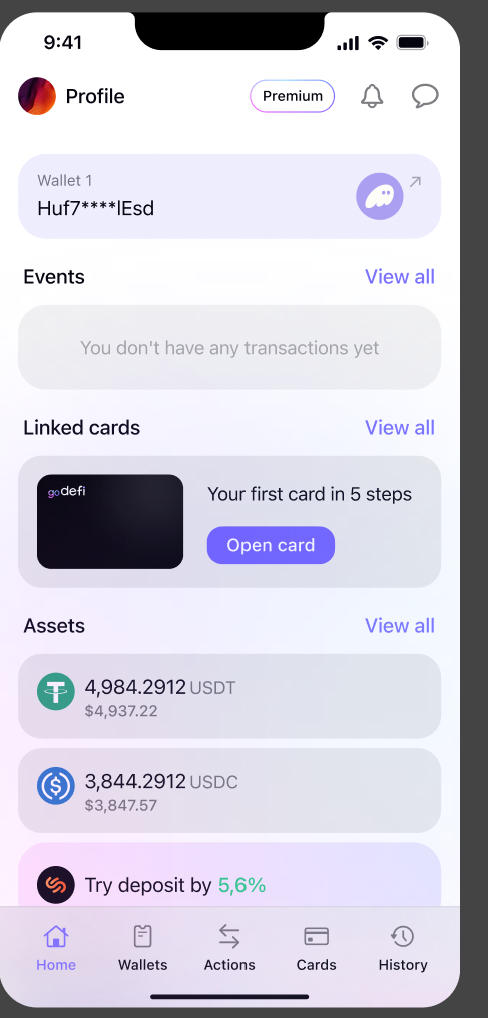
Step 2: Complete KYC Verification
- Email Verification: Confirm your email address for security purposes.
- Set Up Passkey: Enable two-factor authentication (2FA) for extra protection.
- Enter your phone number to support secure authentication, KYC requirements, and 3DS verification when needed. This helps protect sensitive Data in the App.
- Questionnaire. We will ask you to provide some information about yourself in order to create the best service.
- Identity verification. Upload your identity document. We accept passport, residence permit, ID card and driver’s license.
- Residency verification. Upload ID document of your current residency (if different from your nationality). We accept residence permit or ID card.
- Make a selfie
- Wait for confirmation ok
Step 3: Choose Your Subscription Plan*
Select the subscription plan that best fits your needs. (*Coming Soon)
- Explore all plans here
- Complete payment for your chosen subscription or card (for those selecting the free plan, no payment is required).
Step 4: Activate Your Card & Start Spending
Once payment is confirmed, proceed to issue your GoDefi card.
- Set up your spendable balance (What is a spendable balance?)
- For Virtual Cards: Instant activation, add it to Apple Pay or Google Pay.
- For Physical Cards: Receive a tracking number, and follow activation instructions upon delivery (coming soon)
- Spend Directly from Your Wallet: No need to top up—spend straight from your DeFi wallet with transparent, compliant transactions. Your funds stay fully under your control, giving you complete oversight and flexibility throughout the entire process
2. Using Your GoDefi Payment Card
2.1. How does the GoDefi card work with your non custodial wallet?
The GoDefi card connects directly to your DeFi wallet. There’s no need to transfer or top-up your card manually. Simply use your DeFi wallet and pay seamlessly with Apple Pay, Google Pay, or a physical card.
2.2. How Does the GoDefi Card Integrate with Your Non-Custodial Wallet via the SPL Token Model?
GoDefi seamlessly integrates with your non-custodial Solana wallet, offering you complete control over your funds while enabling smooth transactions using the GoDefi card.
Here’s how it works:
1. What is an SPL Token?
The GoDefi card operates using the SPL token standard, which is familiar to Solana users. The SPL token is not a concept created by GoDefi; it is an established standard within the Solana blockchain or EVM based blockchains ERC-20 Token Standard | ethereum.org.
By using SPL tokens, you can access the benefits of decentralized finance (DeFi) without needing to rely on centralized exchanges Token Program | Solana Program Library Docs .
2. Delegation: A Key Feature
In the GoDefi ecosystem, delegation plays a crucial role in enabling seamless transactions. Delegation allows you to assign another wallet to manage your spending without requiring your direct approval for every transaction. This is a unique mechanism that allows your GoDefi card to function efficiently while maintaining the security of your funds (https://spl.solana.com/token#authority-delegation).
When you delegate, you are essentially authorizing another wallet to spend up to a certain limit, but your funds will still remain in your control. The delegated wallet does not have access to your private keys, so you retain full control over your assets.
3. Security of Delegation
It’s important to highlight that while delegation grants temporary spending rights to another wallet, it does not mean that your funds leave your wallet. Your tokens can’t leave the wallet without your explicit consent. This makes the delegation feature a highly secure way to manage transactions.
One key difference between delegating to a smart contract and a regular wallet is that delegating to a smart contract (https://github.com/godeficorp/solana-delegate-proxy) enhances security. Smart contracts can offer more precise control over spending limits and help minimize the risk of fraud or unauthorized transactions. This is a safer approach compared to delegating directly to another wallet.
4. Spending Limits and Control
The GoDefi card allows you to set specific limits for spending “Delegated balance” inside the app, which can be applied to each transaction or a specific token amount. This way, you can control how much you’re willing to spend and ensure your funds remain secure while still enjoying the convenience of the card.
Even when part of your balance is delegated, the funds remain under your control at all times. You can revoke or adjust the delegated access whenever you like. This gives you flexibility while ensuring that your wallet’s security is never compromised.
5. Why Choose GoDefi’s Non-Custodial Approach?
At GoDefi, we believe in providing a non-custodial experience, meaning you have complete control over your assets at all times. We do not store your funds or private keys, ensuring that you are the sole controller of your DeFi wallet. This approach aligns with the core values of decentralization, privacy, and security.
- So why GoDefi?
- The GoDefi card works directly with your non-custodial wallet, using the SPL token standard on Solana.
- Delegation allows another wallet to spend your funds without your signature, but only up to a certain limit, ensuring your control.
- Delegating to a smart contract is more secure than delegating to another wallet, reducing the risk of fraud.
- You control your spending limits and can adjust or revoke delegation at any time.
By understanding these mechanisms, you can use your GoDefi card with confidence, knowing that your funds are secure, under your control, and compliant with the decentralized ethos of GoDefi.
For more information, you can reach out to our support team support@godefi.me.
2.3 What is Spendable Balance?
The Spendable Balance represents the amount you have allocated for spending within the GoDefi app. It’s important to note that this balance does not automatically refresh; once it is used up, you will need to specify and approve a new spending amount.
You can set your Spendable Balance for individual purchases or designate a specific total amount. This feature is easily accessible on the main screen where your card is displayed, making it simple to manage your spending as needed.
For more information, please refer to article How Does the GoDefi Card Integrate with Your Non-Custodial Wallet via the SPL Token Model?
2.4. Is the GoDefi card physical or virtual?
GoDefi offers both virtual and physical card options to suit your preferences. The virtual card is available now and can be easily added to Apple Pay or Google Pay for seamless, contactless payments. Our physical card option is coming soon, allowing you to make in-person transactions wherever cards are accepted. Stay tuned for updates on the release!
2.5. Where can I see card details?
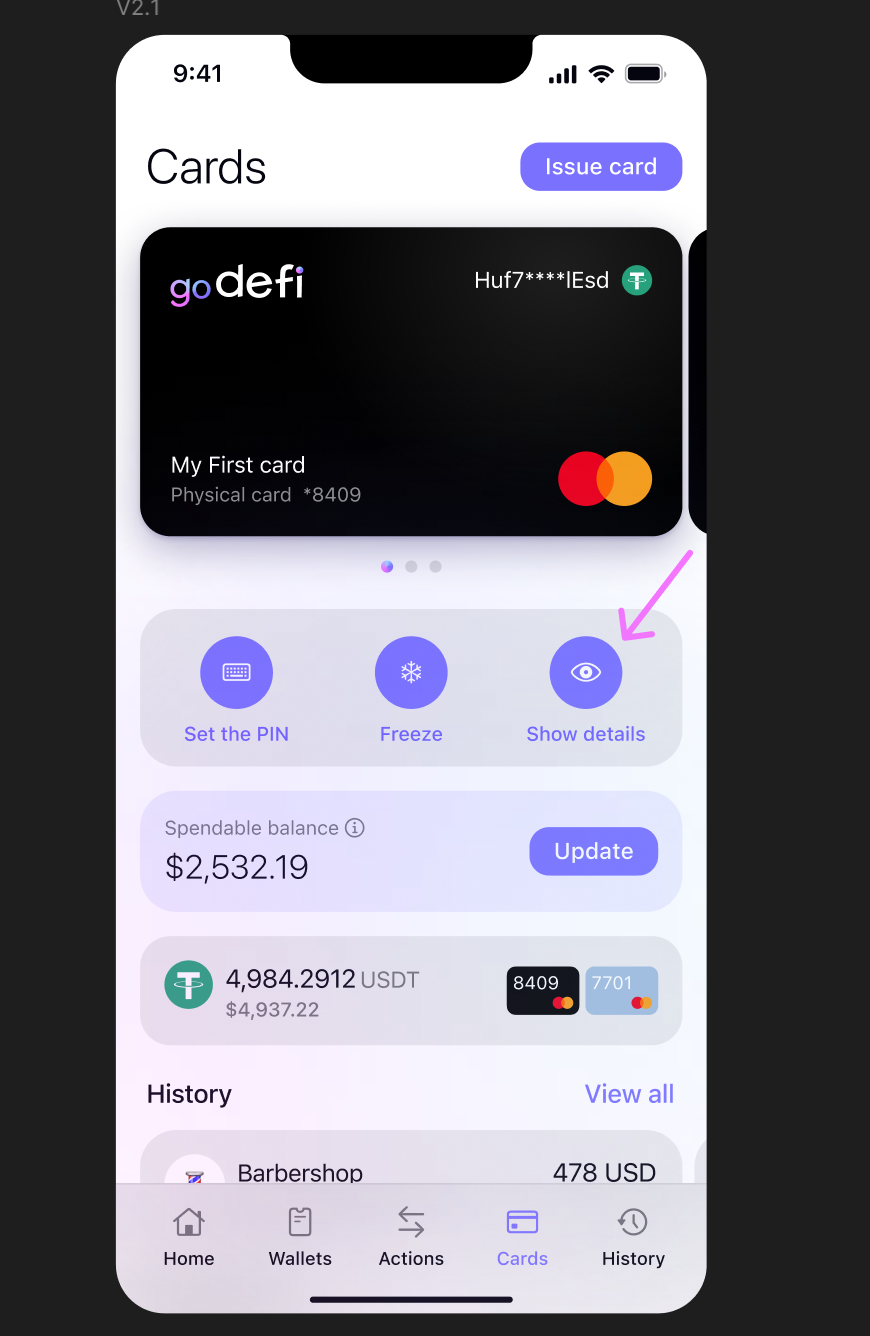
You can view your card details on the main screen of the app, located on the right side.
Please refer to the example below for a visual guide.
2.6. Where can I get Transaction statement
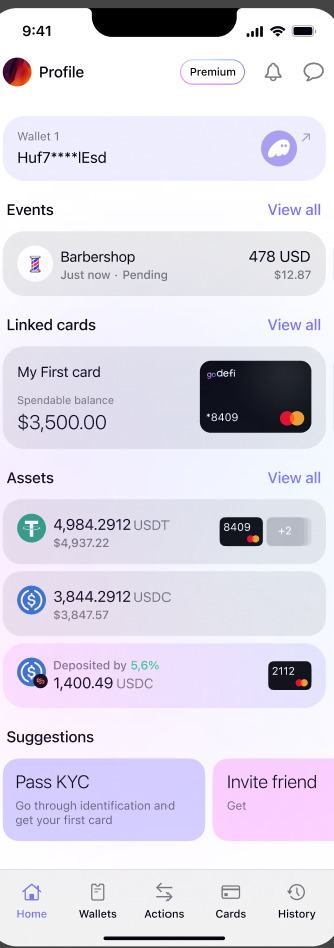
To view your transaction statement, go to the History section, located at the bottom right corner on the main screen of the GoDefi app.
This section displays all past transactions, making it easy to keep track of your activity.
2.7. Is this card personal?
Yes, the GoDefi card is a personal card. It is issued to an individual user and linked directly to their DeFi wallet. This means that each cardholder has full control over their funds and can manage their transactions securely.
Essential Information
Learn more about us and how we want to change the way you pay
3.1. What makes GoDefi different from other crypto cards?
GoDeFi stands out by operating entirely within the decentralized finance (DeFi) ecosystem, offering a fully non-custodial experience. GoDeFi does not hold, store, or access clients’ funds or private keys. This ensures that you maintain complete control over your assets at all times, enhancing both privacy and security.
Additionally, GoDeFi allows you to manually set your spendable balance, which can be adjusted for each individual transaction if desired. This unique feature gives you flexible control over your spending limits, adding an extra layer of customization and security that’s rare in other crypto card services.
With GoDeFi, you get the ultimate balance of security, privacy, and control in a truly decentralized payment solution
3.2. Do I need to hold Solana (SOL) to use GoDefi?
No, you don’t need to hold Solana (SOL) to use GoDefi, but the system is initially built on the Solana blockchain for its speed and low transaction costs. GoDefi plans to integrate with other major blockchains soon, allowing for greater flexibility. We are sponsoring Solana and other blockchains network fees on supported blockchain
3.3. Is GoDefi safe and secure?
Yes, GoDeFi is a fully licensed and regulated, providing a secure and user-centric experience for all clients. GoDefi is regulated by the Financial Analytical Office of the Czech Republic, ensuring that we strictly follow all compliance, AML rules, and relevant legislation.
GoDeFi is a non-custodial service, which means we do not hold or store users’ funds or private keys. Users maintain full control of their assets, with a spendable balance that can be manually set for added flexibility—even on a per-transaction basis. Our commitment to privacy means that we do not store any personal data.
Additionally, GoDeFi is designed as a comprehensive Web3 banking ecosystem. With all necessary licenses in place, we maintain strict KYC and AML protocols, enabling us to provide a safe, legitimate service and work exclusively with verified clients. Privacy and security are paramount in everything we do, ensuring you can use GoDeFi with peace of mind.
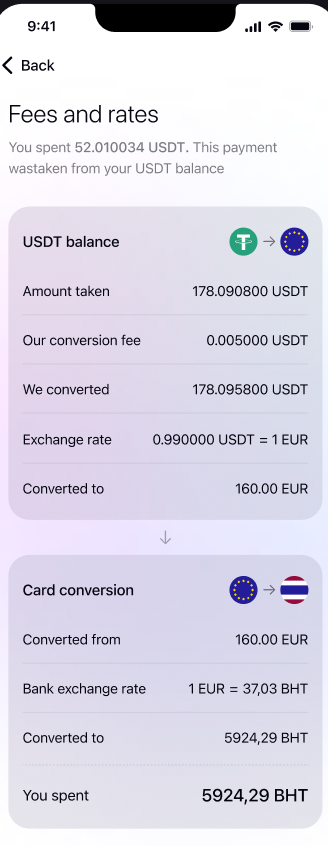
3.4. Are there any fees for using GoDefi?
Yes, GoDefi operates with transparent fees. There are no hidden charges; you will always know the cost upfront before completing any transaction. Depending on your Subscription Plan: you may buy it or make a staking with GoDefi token
3.5. What cryptocurrencies can be used within GoDefi Payment Card?
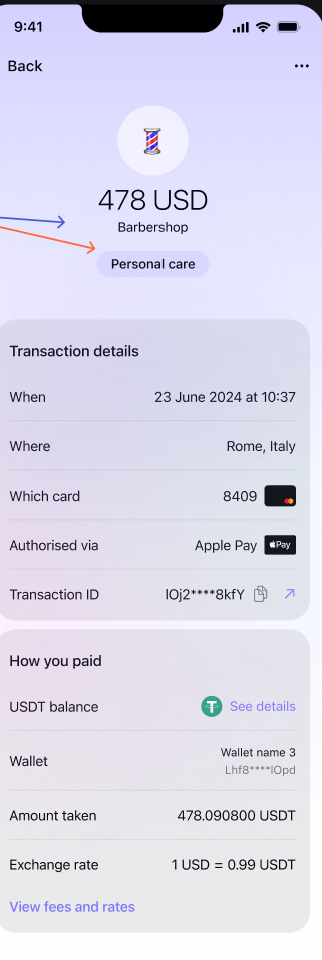
We support popular cryptocurrencies: USDT, USDC, Bonk, JUP. Our list of supported assets is continuously growing to meet the needs of our users.
3.6. What wallets are supported by GoDefi?
GoDeFi works with trusted wallets on the Solana blockchain, including Phantom, Solflare, Ledger, and Avalanche. You can connect your preferred wallet without sharing private keys, allowing you to maintain full control over your finances. Our list of supported wallets is continuously growing to meet the evolving needs of our users.
If you have any suggestions for additional wallets you would like us to support, please feel free to reach out to us via email support@godefi.me
Your feedback is important to us as we strive to enhance your GoDeFi experience!
Our list of supported wallets is continuously growing to meet the needs of our users. Stay tuned ….
3.7. Do you have a referral program?
Yes, we are excited to announce that we will be launching a referral program in the near future!
Stay tuned for updates on the launch of our referral program, and be sure to check back for details on how you can participate and maximize your rewards!
3.8.Where can I use the GoDefi Card?
The GoDefi Card can be used anywhere that accepts Mastercard, allowing users to make purchases online or in-store. The physical and virtual cards are usable at millions of locations worldwide that accept digital card payments.
3.9. Are there any restrictions on the GoDefi Card based on my location?
We are actively working to make the GoDefi Wallet available globally.
Currently, our primary focus is on the EEA region, including all EU countries, as well as Iceland, Liechtenstein, and Norway.
Please note that the GoDefi Payment Card may have specific geographic restrictions due to local regulations. To ensure availability in your region, we recommend checking the latest information in the app or on our website.
Restricted Territories
GoDefi services are currently not available in the following territories: the United States, Russia, North Korea, Iran, Crimea, and Myanmar.
3.10. When will the GoDefi Card be available in my country?
Our team is working to expand the GoDefi Payment Card’s availability to more regions.
Stay tuned for updates on newly supported regions by joining our waitlist or subscribing to our newsletter.
3.11. Can I travel and use the GoDefi Card internationally?
Yes! Once activated, the GoDefi Card can be used internationally, making it ideal for travelers who wish to spend directly from their digital assets without needing to convert to fiat currency without reliance on any centralized intermediaries
- Account security & Verification
4.1 Is it necessary to verify an account?
Yes, account verification is essential. To ensure that our users are reliable and to protect against any potential scams, we require all clients to complete a KYC (Know Your Customer) verification in order to issue a payment card. This process helps us maintain a secure, trustworthy environment for all GoDeFi users.
Please note that GoDeFi prioritizes your privacy and security—we do not store any personal data or private keys on our servers.
In order to activate your account it is required to pass through the following verification steps:
1) Phone number and email verification
2) Identity verification (document upload)
3) Residency verification (document upload)
4) Selfie
5) Questionnaire
4.2 How long does it take to verify an account (KYC)?
Usually the verification process takes from 3 to 5 minutes. However, if submitted documents require advanced checks, it can take up to 24 hours. (Note: advise to change to 3 days or up to 2 business days to cover weekend)
4.3 Verification requirements
- Questionnaire. We will ask you to provide some information about yourself in order to create the best service.
- Identity verification. Upload your identity document. We accept passport, residence permit, ID card and driver lisence.
- Residency verification. Upload ID document of your current residency (if different from your nationality). We accept residence permit or ID card.
- Make a selfie.
4.4. How do I update my phone number?
To update your phone number, please reach out to our Customer Support team via email support@godefi.me.
We’ll be happy to assist you promptly.
4.5. Why are my registration documents getting rejected?
Unfortunately, we cannot determine specific reasons for individual rejections, as this process is handled by our verification partner for security purposes.
To ensure a smoother process:
- Make sure all images are clear, legible, and up-to-date.
- Ensure that all submitted information matches official records exactly.
If you continue to experience issues, please reach out to our support team for assistance.
4.6. What’s the minimum age for opening a GoDefi account?
To open a GoDefi account, you must be at least 18 years old.
This age requirement ensures that all users are legally able to enter into contracts and manage their financial activities responsibly
4.7. Can I access my wallet from another device?
Yes, you can access your wallet from another device. Simply download the GoDefi app on the new device, and connect your existing wallet to get started with 2 FA step. Your wallet balance and settings will sync, allowing you to manage your assets seamlessly across devices.
- A troubleshooting section
5.1. Lost or Stolen Card
If your card is lost or stolen, please follow these steps:
- Freeze & Reissue: You can immediately freeze your card in the app to prevent any unauthorized transactions. A replacement card can be requested directly through the app.
- Contact Support: Alternatively, reach out to our support team via email support@godefi.me for assistance with freezing and reissuing your card.
5.2. If the Solana network stops suddenly, or dies altogether.
Will the GoDefi account continue to function? Is there a replacement blockchain in sight?
In the unlikely event that the Solana network experiences downtime or even ceases operation, the GoDefi platform may be temporarily impacted, as it relies on the Solana blockchain to process transactions and maintain wallet connectivity. Unfortunately, GoDefi cannot enforce control over the Solana network’s functionality, as it operates independently from our service.
However, we are actively monitoring developments in blockchain technology. If there is a need for a transition or a reliable alternative, our team will consider supporting additional blockchains to ensure continuity and adaptability for our users.
We recommend staying updated with our announcements for any changes related to network support.
5.3. I cannot sign in my account
If you’re experiencing issues signing in to your GoDefi account, please try the following steps:
- Check Your Internet Connection: Ensure that your device is connected to a stable internet network. Sometimes, poor connectivity can prevent the app from loading correctly.
- Update the App: Make sure you’re using the latest version of the GoDefi app. Outdated versions may cause login issues.
- Clear Cache and Restart App:For mobile devices, try clearing the app cache and restarting it. This can often resolve temporary issues.
If you’ve tried all these steps and are still unable to sign in, please contact our support on GoDefi – Web3 Banking in Help center section team for further assistance.
Should you have any problems with activating and usage of the Card please contact customer support for further assistance
To create a support ticket, please write to example support@godefi.me